This post was originally published in French only. We translated it in 2026 so the archive reads the same in both languages. Read the original →
June takes on a special flavor this year on the Hackfest blog: four articles on assembly programming will be published, one each week, and the month will be capped off with a HackerSpace presentation on the topic. Hopefully you'll learn something! Here is the first article in this series. The articles for week 2 and week 3 are also available.
Assembly: who hasn't wanted to learn this somewhat cryptic language? Unfortunately, very few people actually dive into learning assembly languages. One of the reasons is probably the learning curve, which seems pretty steep. On top of that, a popular belief that says “you need way too many lines of code to build a meaningful application” doesn't help encourage people to learn assembly either.
The reality is quite different!
Learning an assembly language is simple, as long as you put in the effort, and writing a program in assembly can very well be fast and no more complicated than writing a C program. There is only one rule: Patience.
First of all, you need to know that every assembly language is “made” to work with a specific architecture. For example, in this series of articles, we'll discuss an assembly language made to work with processors of the x86 family. The language you'll learn by reading these articles therefore couldn't run on a Rasbery Pi, since the latter uses an ARM architecture with its own assembly. Programs written in assembly are therefore not portable from one architecture to another.
As with every good introduction to assembly, there's no escaping it: we have to start at the beginning and talk about the processor itself. Since we're only writing four articles and not a book, the introduction to the concepts will be fairly quick. So we'll avoid talking about the processor's various internal units and accept this level of abstraction for the processor itself and memory, without worrying, for now, about other peripherals or the buses connecting all these elements together. It's important to remember that this text is an introduction aimed at programmers (and non-programmers) of all levels. So don't be shocked if you find the level of abstraction too high (if you want to chat about it, you can always buy me a beer at the next hackerspace :P )...
The processor and memory
To work, your computer needs a minimum of components. In our case, we'll limit these components to two elements: the processor and memory. These two elements are connected by a “bus” that lets the processor access the various memory cells, for reading and writing. Roughly speaking, all the information needed to run a program is kept in the computer's memory. This means that the execution instructions as well as the various variables used by applications are kept in memory. Inside the processor, mechanisms are in place to let it fetch the information and the instructions to be executed. The processor therefore knows, at every moment of execution, which instruction is next to be read and executed. The following illustration shows a processor about to fetch the first instruction from memory.
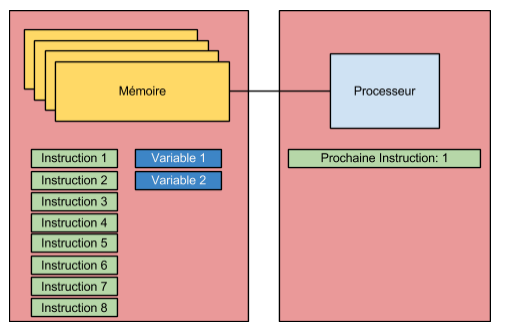
So, while the application runs, the area of the processor (which we'll call a register from now on) responsible for keeping a link to the next instruction gets updated from instruction to instruction, so it's always able to fetch the next instruction and thus keep the application running. The following illustration shows the second step of the execution process started in the first illustration.
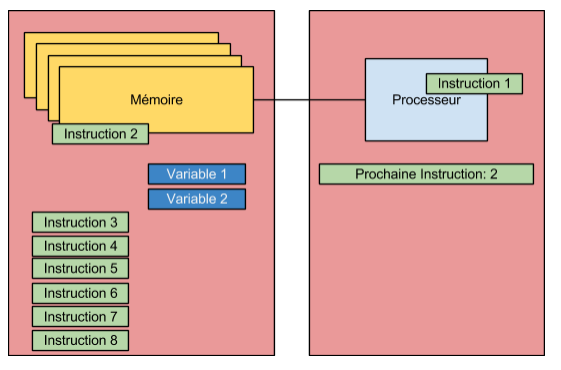
The application's execution therefore moves from one instruction to the next by fetching information from memory. So, contrary to what many people tend to believe, assembly code isn't directly in the processor but in memory. The processor does fetch the instructions one by one from memory, and executes them according to the logical order established by the application. A program, assembly or not, is therefore nothing more than a sequence of instructions read from memory by the computer's central processing unit. Of course, the processor (in the case of x86) itself has a certain amount of memory (cache memory; other areas also exist, including the registers, which we'll talk about further on) that lets it hold a certain number of instructions in advance, and thus avoid direct memory accesses as much as possible, since these are, on a processor's scale of course, very slow. There you go, the basic concept is laid out! At all times, remember that everything is a matter of memory. In a basic program, everything is a matter of memory
Processor layout
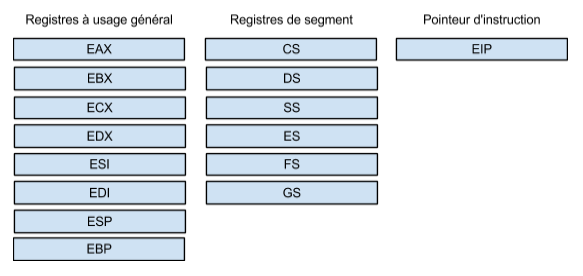
Every processor has a structure. Assembly programming lets the programmer order the central processing unit to modify the elements present in its structure, mainly the registers inside the processor. Through the operations they send to the processor, programmers can therefore place information in the registers so that other operations can use that information. After processing the data, the programmer, still using operations sent to the processor, can retrieve the result of the previous operations and thus build the application's logic according to the program's needs. Registers are therefore extremely important for the assembly programmer. There are several types of registers. The following illustration shows some of the main registers of the x86 architecture. Note that this illustration deliberately leaves out several registers, as well as the register containing the processor's “flags”, since these flags will be covered in detail when we use ASM instructions and the debugger.. Since we'll come back to the flags register, there's no need to introduce them right now. Also, since most of the information available online uses the registers in 32-bit mode, we too decided to use the registers in 32-bit mode, mainly because of the end goal of this series (surprise surprise, you'll see at the HackerSpace!).
General-purpose registers
Eight registers are considered “general-purpose”. This name is actually a bit of a stretch. Indeed, the established “conventions” mean that we can't really do whatever we want with all of these registers. Of course, these “conventions” could be avoided in some situations, but generally speaking, when a programmer writes a program that will run on a specific operating system, they must follow the rules in force on that operating system. So, also for performance reasons (which we won't discuss), it's recommended to use the general-purpose registers for certain specific tasks.
EAX
The EAX register is generally used to retrieve the result of operations. For example, if a function returns a value, that value could be returned, when the function exits, in the EAX register.
EBX
The EBX register will generally be used as a base index when working with arrays. This register will therefore generally point to data in memory.
ECX
The ECX register is generally used as a counter. For example, it could be used to hold the current index while iterating over an array.
EDX
The EDX register normally points to data in memory. No particular use is dedicated to it.
ESI
The ESI register is often used, when performing operations on strings, to hold the index of the source string.
EDI
The EDI register is the “opposite” of the ESI register. It's used to hold the index of the destination string. So you've figured out that these two registers are often used together when copying and comparing strings.
ESP
This register has a special status. It normally points to the top of the execution stack. This famous stack will get special attention in an upcoming article when we talk about function calls.
EBP
This register also has a special status. It will point not to the top, but to the bottom of a frame of the execution stack. We'll talk about it again a bit later.
Of course, keep in mind that these “conventions” can have exceptions: it's up to the programmer to use the registers as they see fit. However, if you use the features of an operating system, you'll have to comply with the conventions in force on that system.
EIP instruction pointer
EIP is a special register. It's the instruction pointer. This register is in charge of pointing to the next instruction to be executed. To make a long story short, here's a graphic you'll recognize, this time adapted to show the position of the EIP register.

So you've figured out that this register plays a very important role, since it's through “it” that the “flow” of instructions happens.
This article covers one last type of register: segment registers. These registers have a particular function. They're in charge of pointing to the memory cells containing the application's various segments.
Segment registers
Roughly speaking, an application generally has three segments. The first segment, the code segment (CS), points to the memory area containing the application's code. The EIP register will point to the instructions in this segment so the processor can execute them. The second segment, the data segment (DS), points to the memory area containing the application's variables. In short, as its name says, it points to the application's data. The application's third segment points to the application's execution stack (SS), the stack. We'll talk about this execution stack in more detail eventually. The three other segment registers are “extra” registers that can be used as needed.
And so ends the first week of x86 assembly month. We may not have programmed in assembly yet but, one thing is certain, this article represents the bare minimum knowledge required to start programming in x86 assembly. If you've understood this article well, you'll have no trouble with what comes next!
In the meantime, until next week, feel free to contact us if you have any questions! For those of you who'd like to follow this series and code the exercises that will be presented, you can already set up a Linux virtual machine, because the rest of this month will take place on Linux. Until then, have a great week everyone!